Enter Promo Code: SAVE40NOW during checkout.
Wednesday, November 27, 2013
Sunday, June 3, 2012
Elisha Cuthbert Illustration Smudge
(Click on image to view larger version)
Created with my Illustration Action followed by Smudge Technique
Original
Saturday, April 21, 2012
Sunday, February 26, 2012
Michelangelo Conté Crayon Sketch
(Click on image to view larger version)
Created with my Sketch Action using Colorized Ink and Paper option.
David sculpture by Michelangelo - Circa 1500
Saturday, February 4, 2012
Comic Illustration
Comic Illustration look using my Charcoal Sketch Action
with added layers for more contrast and toning.
Saturday, December 3, 2011
Free Christmas Frame Templates
(Click on image to view large version)
Example of my 8" X 10" Christmas Frame Template and Illustration Action.
Sunday, November 6, 2011
Weave Templates
This was created using the Spherize Filter.
New Weave Templates (Also works in Elements)
Sunday, October 30, 2011
Free Halloween Frame Template Set
Frame Set includes 8" X 10" X 300 ppi Horizontal and Vertical Frame Templates.
Year can be changed each year by using the Find and Replace Text feature in Photoshop.
Load the included font into your system before opening the templates.
Wednesday, August 31, 2011
10" X 20" Poster Print / Collage Mat Templates
(Click on images to view large version)
10" X 20" Hi-Res Photoshop Poster Print / Collage Mat Templates
with optional Hi-Res Frame Layer.
Tuesday, August 30, 2011
5" X 7" Photoshop Collage Mat Templates
(Click on images to view large version)
15 Hi-Res 5" X 7" Photoshop Collage Mat Templates
with optional Hi-Res Frame Layer.
Thursday, August 25, 2011
12" X 12" Photoshop Collage Mat Templates
(Click on images to view large version)
25 Hi-Res 12" X 12" Photoshop Collage Mat Templates
with optional Hi-Res Frame Action.
Thursday, June 23, 2011
Flower Girl Illustration
(Click on images to view large version)
Original Photo by Ray Connolly
Result after using my Photoshop Illustration Action
Wednesday, June 22, 2011
Boy with Great Grand Dad Illustration
(Click on images to view large version)
Original Photo by seemerollin
Result after using my Photoshop Illustration Action
Sunday, June 12, 2011
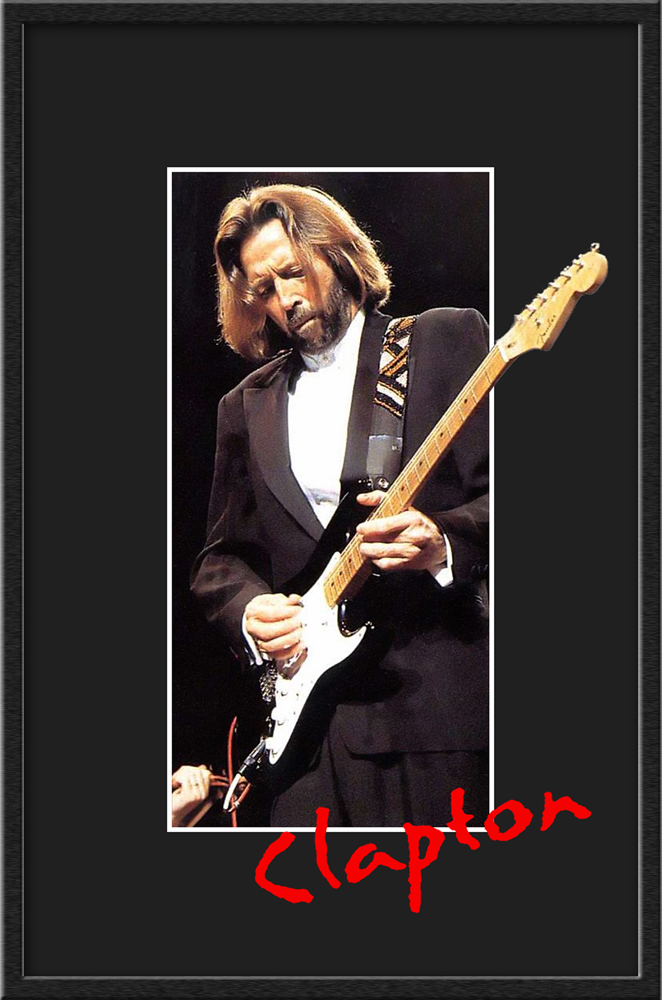
Eric Clapton Out of Frame Tutorial / Video
(Click on image to view large version)
Out of Frame result after adding Mat and Frame to original image.
Download Quicktime Video (.mov)
Steps used in Video:
Open Image
Select All-Copy (for pasting later)
Set guidelines for mat opening
Use marquee tool to make selection
Image-Crop
Edit-Fill with Black
Increase Canvas Size
Clear Guides
Use magic wand to make selection of the mat
Layer-New Layer Via Cut
Change background layer to a working layer
Select All-Delete
Adjust Opacity of top layer to around 65%
Paste image into transparent bottom layer
Position image under mat
Select top mat layer-add layer mask
Select layer mask-Paint black in layer mask to show part of image that is to appear outside the mat opening
Set layer opacity back to 100%
Clean up mask selection using white or black in layer mask
(Note how I used the magic wand on the image to help clean up the mask)
Optional steps to add a second top mat and text:
Duplicate Layer
Make a selection of the mat opening with magic wand
Expand selection for top mat
Set guides-Marquee Selection-Delete
Fill top mat with Black (bottom mat remains white for a look of a bottom mat or white inside border)
Clear Guides
Add Text above top layer
At this point you are done. Save the image.
Optionally, run my frame action to add a frame.
Download Frame Action from here:
Friday, June 10, 2011
Angelina Jolie - Illustration / Pop-Art Illustration
(Click on images to view large version)
Original Photo
Result after using my Photoshop Illustration Action
Result after using my Photoshop Pop-Art Illustration Action
Result after using my Pop-Art Color Variation Frame Action
Sunday, June 5, 2011
30 Rock - Illustration
(Click on images to view large version)
Original Photo
Result after using my Photoshop Illustration Action
Enlargement to show Illustration detail
Saturday, June 4, 2011
Oprah Tribute - Photoshop Sketch Action
(Click on images to view large version)
Original Photo
Pen and Ink Sketch
using my Sketch Action and Pen and Ink Finisher Action
Blend of Pen and Ink Sketch over Original Photo
Set to 85% Luminocity, then flattened
Increased Color Saturation using Hue/Saturation
Adding Contrast with an S-Curve
We'll miss you Oprah!
Tuesday, May 31, 2011
Free Photoshop Actions and Templates
Example of my Free Polaroid SX-70 Action
Example of my Free Polaroid Out-of-Bounds Template
Saturday, March 26, 2011
24" X 30" Memorial Collage Template Mat
My new 24" X 30" Memorial Collage Mat Template has one large 10-1/2" X 15-1/4" opening in the center with 86 small outside openings in popular ratios (4 x 5, 4 x 6, 6 x 4 and square) to accommodate images of friends and family to create a special tribute of a loved one for a Memorial Service, Special Birthday or Anniversary.
Add color, texture or an image to the face of the mat to tie in with the main image. The openings have layer effects to simulate mat bevels with drop shadows to give it a realistic custom collage mat look. The template can be downsized to print 16" X 20" or 8" X 10" keepsakes of the occasion.
Tuesday, January 4, 2011
Subscribe to:
Posts (Atom)